

Creating APKs from AAB Using BundleTool

Satyma N.

Jan 06, 2026

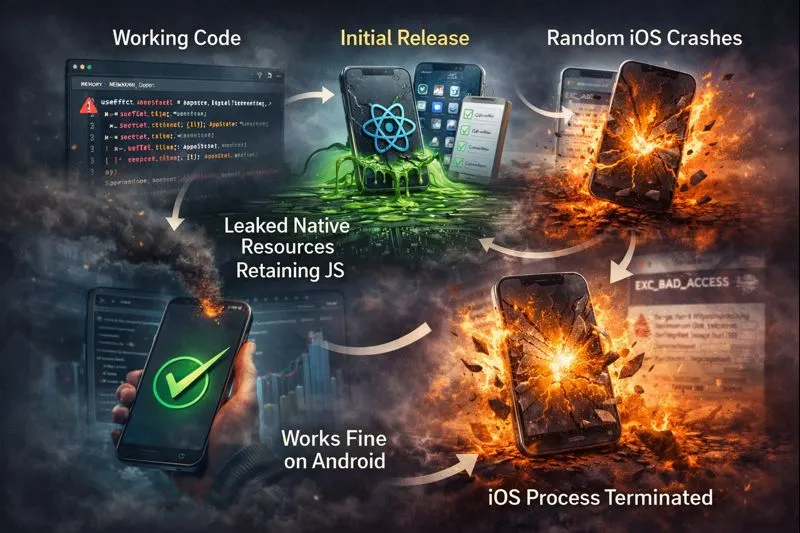
Let’s start with an uncomfortable truth: The most dangerous React Native memory leaks don’t throw errors. They don’t show warnings. And they don’t crash your app immediately.
They wait. They hide behind “working code.” They pass QA. They survive release. And then — weeks later, your app starts crashing randomly. Mostly on iOS. Mostly after navigation. Mostly when you’re not watching.
This is the kind of bug that often gets misattributed to React Native itself. In practice, it’s usually a mismatch between React’s lifecycle model and unmanaged native side effects.
The Day Everything Started “Randomly” Crashing
Our React Native app looked stable. No red screens, no obvious performance issues, and no reproducible steps to failure. Yet, iOS crash reports kept increasing.
It wasn’t consistent. Scrolling caused a crash; navigating back caused a crash; returning from the background caused a crash. There were no JavaScript errors. The JS thread looked fine. But the memory usage slowly, silently crept up until the OS had no choice but to kill the process.
This is the classic React Native memory leak: the “Ghost Reference.” To understand why this happens, we need to look past React and into how React Native actually holds memory.
The Day Everything Started “Randomly” Crashing
Most developers operate under a subtle but dangerous assumption: when a component unmounts, everything associated with it is gone.
React doesn’t work that way. React is a UI library — it manages the render tree and its own effects. It does not have ownership over native resources created outside its lifecycle.
React only cleans up:
- React state
- Effects it explicitly knows about
React does not automatically clean up:
- Native event listeners
- Intervals and Timers
- Navigation subscriptions
- Native module callbacks (GPS, Sensors, Bluetooth)
The problem isn’t React itself — it’s what happens when JavaScript and native code start sharing responsibility. To see where memory actually gets retained, we need to look past React and into how React Native holds references under the hood.
Deep Technical Explanation: The Bridge Retention
A React Native memory leak occurs when native code continues to hold a reference to a JavaScript callback after the component that created it has unmounted.
In React Native, JavaScript and native code communicate through the bridge — or, in newer architectures, via JSI. In both cases, native modules can retain references to JavaScript callbacks. When you pass a function to a native module (like a listener), you aren’t just passing code; you are creating a “closure.” This closure captures the scope around it — including variables, state, and the component itself.
If the native side doesn’t release that reference, the JavaScript Garbage Collector (GC) cannot reclaim the memory for that component, even if it’s no longer on the screen. The component becomes a “zombie” invisible, but still eating RAM.
The Silent Memory Leaks Most Apps Have
1. Event Listeners Without Cleanup
This is the number one killer. If you attach to 𝐀𝐩𝐩𝐒𝐭𝐚𝐭𝐞 or 𝐊𝐞𝐲𝐛𝐨𝐚𝐫𝐝 and don’t return a cleanup function, that listener lives forever.
Example:
useEffect(() => {
  const sub = AppState.addEventListener(
    'change',
    handleChange
  );
  // Missing: return () => sub.remove();
}, []);
2. Navigation Listeners Retaining Screens
Navigation libraries often live on the native side. If you subscribe to a 𝐟𝐨𝐜𝐮𝐬 event and don’t unsubscribe, the entire screen’s data stays in memory because the listener closure is still “alive.”
Example:
useEffect(() => {
  const unsubscribe = navigation.addListener(
    'focus',
    () => {
      setHeavyState(data);
    }
  );
  return unsubscribe;
  // If this line is missing, the screen never dies
}, [navigation]);
3. Native Modules & Sensors
Location services, accelerometers, and Bluetooth modules are notorious. If you call 𝐰𝐚𝐭𝐜𝐡𝐏𝐨𝐬𝐢𝐭𝐢𝐨𝐧𝐀𝐬𝐲𝐧𝐜 and don’t stop the watcher, the GPS hardware continues to stream data to a JavaScript function that no longer has a UI to update.
Why iOS is Ruthless (and Android is Forgiving)
Android allows for larger memory growth and is more relaxed about background memory usage. iOS is the opposite. It enforces strict memory pressure limits. When an iOS device hits a certain threshold, it sends a 𝐝𝐢𝐝𝐑𝐞𝐜𝐞𝐢𝐯𝐞𝐌𝐞𝐦𝐨𝐫𝐲𝐖𝐚𝐫𝐧𝐢𝐧𝐠 signal. If the app doesn’t reduce its footprint immediately, the OS sends 𝐒𝐈𝐆𝐊𝐈𝐋𝐋.
“It works on Android” is not proof of correctness; it is a sign of a masked bug.
This is why memory leaks surface first — and most painfully — on iOS, often long after the code that caused them shipped.
How to Detect These Leaks in Production
The Xcode Instruments Strategy (iOS)
- Open your project in Xcode and go to Product → Profile.
- Select Leaks or Allocations.
- Repeatedly push and pop the suspicious screen.
- If the “Persistent Bytes” column only goes up and never returns to the baseline, you have a leak.
The Android Studio Profiler
- Open the Profiler tab in Android Studio.
- Monitor the Memory track.
- Force a Garbage Collection (trash can icon).
- If memory remains high after a manual GC and a screen unmount, you are retaining objects in the Java heap.
Once you understand how these leaks form, the next question is obvious: how do you prevent them from ever reaching production? The answer isn’t better debugging — it’s better architecture.
Automating the Cure: The “Safety-First” Architecture
Debugging leaks is a skill. Preventing them systematically is engineering maturity.

The goal isn’t to remember cleanup every time — it’s to make leaks hard to write in the first place.
1. The Custom ESLint Guardrail
Add this rule to your .𝐞𝐬𝐥𝐢𝐧𝐭𝐫𝐜.𝐣𝐬 to ensure your effect dependencies are at least being tracked, which is where most cleanup logic fails:
Example:
module.exports = {
  rules: {
    "react-hooks/exhaustive-deps": "error",
  },
};
2. The “Safe Listener” Pattern
Wrap common native subscriptions in custom hooks. This abstracts the cleanup logic so the product engineer doesn’t have to remember it.
Example:
export const useAppState = (
  onChange: (status: AppStateStatus) => void
) => {
  useEffect(() => {
    const subscription =
      AppState.addEventListener(
        'change',
        onChange
      );
    return () =>
      subscription.remove();
  }, [onChange]);
};
The “Zero-Leak” PR Checklist
Before merging, check if the code includes any of the following without a return () => ... cleanup:
-
Timers:
setInterval / setTimeout -
EventEmitters:
AppState, Keyboard, BackHandler -
Navigation:
navigation.addListener -
Animations: Reanimated
useSharedValueloops - Hardware: Geolocation, Bluetooth, Sensors
Final Thought: The “Hotel Room” Rule
This is the kind of bug that often gets misattributed to React Native itself. In practice, it’s usually a mismatch between React’s lifecycle model and unmanaged native side effects. Native side effects are unforgiving. Treat every component like a hotel room. If you brought a “native” guest in (a listener, a timer, a stream), you are responsible for making sure they leave when you check out.
If you leave the light on (the timer running), the bill (the RAM) keeps increasing until the manager (the iOS Kernel) kicks everyone out.
If your app crashes “randomly,” it’s not random. It’s memory you forgot to release. Your future self will thank you for the cleanup you write today.