

REST vs GraphQL: What Changed After We Adopted GraphQL in NestJS

Jayendra J.

Jan 07, 2026

When building backend applications, choosing the right API architecture has long-term consequences.
REST APIs have been the default for years — simple, predictable, and well understood. But as applications become more frontend-driven (React dashboards, mobile apps, multiple clients), REST can start to work against you rather than for you.
In this post, we’ll compare REST and GraphQL from a real NestJS project, explain where REST broke down for us, and show how GraphQL helped us ship faster with fewer API changes.
What Is a REST API?
REST (Representational State Transfer) is an architectural style where data is exposed via multiple endpoints, each representing a resource.
Example (REST)
GET /users/1
GET /users/1/posts
GET /users/1/profile
Each endpoint returns a fixed data structure, defined by the backend.
Advantages of REST
- Simple and easy to understand
- Works well with HTTP caching
- Mature ecosystem and tooling
- Great for small to medium applications
Problems We Faced with REST
As the application grew, we started noticing issues:
- Over-fetching (getting unnecessary data)
- Under-fetching (needing multiple API calls)
- Too many endpoints to maintain
- Frontend changes required backend changes
None of these problems appeared early on. REST worked well when the application was small and the frontend requirements were stable.
The friction started when different screens needed different data shapes, and frontend iteration speed increased.
What Is GraphQL?
GraphQL is a query language for APIs that allows the client to request exactly the data it needs — nothing more, nothing less.
Instead of many endpoints, GraphQL exposes a single endpoint.
Example (GraphQL)
query {
  user(id: 1) {
    name
    email
    posts {
      title
    }
  }
}
The key shift with GraphQL is data ownership: the backend defines what is possible, while the frontend decides what is necessary.
REST vs GraphQL: Key Differences
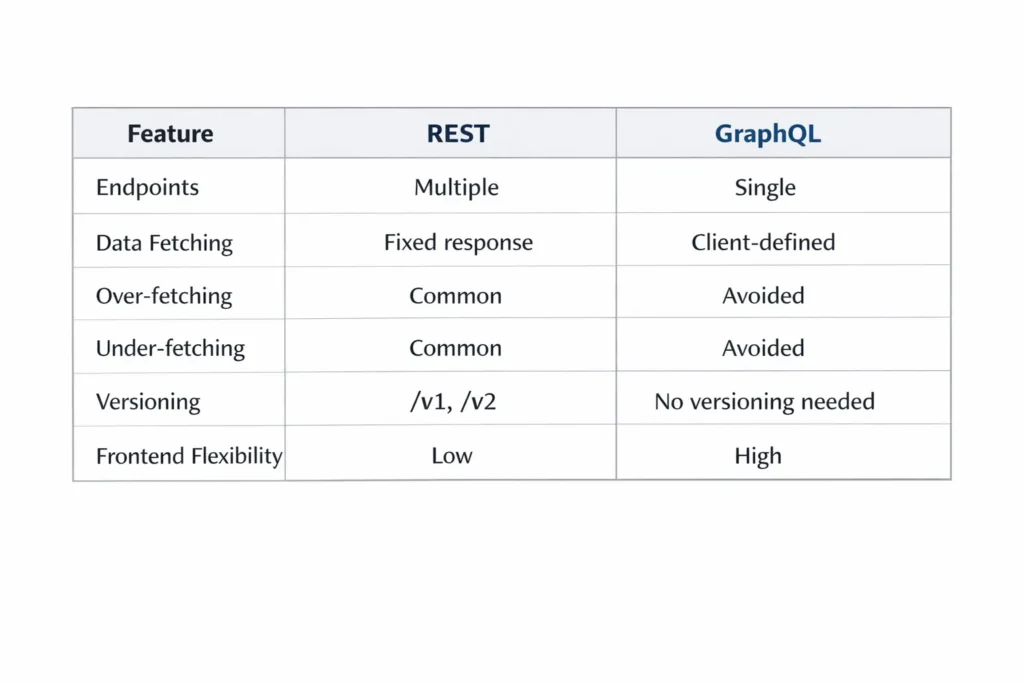
Why We Chose GraphQL for Our NestJS Project
We were working on a NestJS backend powering a frontend-heavy application (React and mobile clients). Each screen needed a slightly different version of the same data.
With REST, this led to:
- New endpoints for small variations
- Optional query parameters that grew out of control
- Responses bloated with unused fields
GraphQL removed these trade-offs. One endpoint, flexible queries, and frontend-driven data needs — all without backend churn.
GraphQL in NestJS: Setup & Real-World Examples You Actually Need
Most GraphQL tutorials stop at simple CRUD examples.
In real projects, we deal with nested relations, conditional fields, pagination, and optimized queries.
Let’s cover proper setup first, then move to important real-world GraphQL examples.
GraphQL Setup in NestJS (Step-by-Step)
1. Install Required Packages
npm install @nestjs/graphql @nestjs/apollo graphql
2. Configure GraphQL Module
app.module.ts
import { Module } from '@nestjs/common';
import { GraphQLModule } from '@nestjs/graphql';
import { ApolloDriver, ApolloDriverConfig } from '@nestjs/apollo';

@Module({
  imports: [
    GraphQLModule.forRoot<ApolloDriverConfig>({
      driver: ApolloDriver,
      autoSchemaFile: true,
      playground: true,
    }),
  ],
})
export class AppModule {}
— Auto-generates the schema
— Enables GraphQL Playground at /graphql
3. Recommended Folder Structure
src/
├── user/
│   ├── user.module.ts
│   ├── user.resolver.ts
│   ├── user.service.ts
│   ├── user.entity.ts
This structure keeps GraphQL logic modular, readable, and scalable as the schema grows.
Important GraphQL Examples (Production-Level)
Example 1: Nested Relations (User → Posts → Comments)
Why this matters:
Frontend applications often need deeply related data in a single request. With REST, this usually requires multiple API calls or custom endpoints.
GraphQL Query
query {
  user(id: 1) {
    name
    email
    posts {
      title
      comments {
        message
        author {
          name
        }
      }
    }
  }
}
Resolver Example
@Resolver(() => User)
export class UserResolver {
  constructor(private userService: UserService) {}

  @Query(() => User)
  user(@Args('id') id: number) {
    return this.userService.findUserWithPosts(id);
  }
}
— Single request
— Exact data needed
— No over-fetching
In production, this pattern pairs well with tools like DataLoader to avoid N+1 query issues.
Example 2: Conditional Fields (Frontend-Controlled Data)
Problem in REST
You often return extra data even when the frontend doesn’t need it.
GraphQL Query (Admin View)
query {
  user(id: 1) {
    name
    email
    role
    subscription {
      status
      expiresAt
    }
  }
}
GraphQL Query (Public View)
query {
  user(id: 1) {
    name
  }
}
The backend remains unchanged while the frontend controls the response shape.
Example 3: Pagination (Very Important)
GraphQL Query
query {
  users(page: 1, limit: 10) {
    data {
      id
      name
    }
    meta {
      total
      page
      lastPage
    }
  }
}
GraphQL Types
@ObjectType()
class UserPagination {
  @Field(() => [User])
  data: User[];

  @Field()
  total: number;

  @Field()
  page: number;

  @Field()
  lastPage: number;
}
Resolver
@Query(() => UserPagination)
users(
  @Args('page') page: number,
  @Args('limit') limit: number,
) {
  return this.userService.paginate(page, limit);
}
— Clean pagination
— Frontend-friendly
— No custom REST response structure
Whether you return pagination metadata as a meta object or flatten it is less important than keeping the contract consistent across queries.
Example 4: Mutations with Validation
Create User Mutation
mutation {
  createUser(input: {
    name: "Jayendra"
    email: "jay@gmail.com"
  }) {
    id
    name
  }
}
Input DTO
@InputType()
export class CreateUserInput {
  @Field()
  name: string;

  @Field()
  email: string;
}
Mutation Resolver
@Mutation(() => User)
createUser(@Args('input') input: CreateUserInput) {
  return this.userService.create(input);
}
— Strong typing
— Validation-ready
— Cleaner than REST body parsing
Why These Examples Are Important
These are real production scenarios — not tutorial-level CRUD.
GraphQL helps you:
- Reduce API calls
- Improve frontend performance
- Avoid breaking API changes
- Scale without versioning
This is where GraphQL delivers its real value in a NestJS application.
Final Thoughts
REST is still a solid choice — it’s not outdated, and for simple or stable APIs, it may be the better option.
But for modern applications with multiple clients, fast-moving frontends, and complex data requirements, GraphQL — especially with NestJS — offers a more flexible and future-proof approach.
For our team, switching to GraphQL improved developer experience, reduced API churn, and made frontend-backend collaboration significantly smoother.
If you’re building APIs with NestJS and juggling multiple frontend clients, I’d strongly recommend evaluating GraphQL early — before REST complexity starts to accumulate.