

Stop Shipping Secrets: A Practical Guide to AWS SSM Parameter Store

Debakshi B.

Jan 17, 2026


Most security incidents we have seen did not start with a sophisticated attack. They started with something far more ordinary: a leaked .env file, a secret copied into Slack, or a credential baked into an image and forgotten about.
As systems grow, configuration tends to sprawl. What begins as a handful of environment variables slowly turns into dozens of values scattered across servers, pipelines, and repositories. At some point, no one is quite sure who owns which secret or what would break if it changed.
This is exactly the problem AWS Systems Manager Parameter Store is designed to solve: not by adding complexity, but by introducing structure, consistency, and control around configuration and secrets.
This post focuses on:
- Why configuration is a security concern in the first place
- How Parameter Store improves that situation
- Concrete IAM policy examples
-
A practical migration path from
.envfiles - Clear guidance on when to use Parameter Store and when not to
Where Configuration Usually Goes Wrong
Most teams do not start out insecure. They start out fast.
A .env file feels harmless at first. It is local, easy to reason about, and works well when there is only one environment and one developer. The problems appear gradually:
- The same file is copied between machines
- Values diverge between environments
- Secrets are shared to “just fix prod quickly”
- CI pipelines begin to mirror production credentials
Eventually, configuration becomes both critical and fragile — where changing a single value feels risky because no one is sure who depends on it.
Centralizing configuration is not just an operational improvement. It is a security decision.
What SSM Parameter Store Actually Gives You
SSM Parameter Store is a managed service in Amazon Web Services for storing configuration as key-value pairs, but its real value is not storage. It is control.
Out of the box, Parameter Store provides:
- Encryption at rest using AWS KMS
- IAM-based access instead of shared secrets
- Versioning and change history
- CloudTrail logs for auditing
Taken together, these features turn configuration from tribal knowledge into something auditable, and permissioned — which is exactly what we want for secrets.
SecureString as the Default, Not the Exception
One of the most common — and most avoidable — mistakes we see is treating SecureString as optional.
If a value is sensitive, it should be encrypted. Full stop.
Using SecureString ensures:
- The value is encrypted at rest
- Decryption requires explicit IAM permission
- Accidental exposure is much harder
This single choice removes a surprising number of downstream risks.
Naming Is a Security Decision
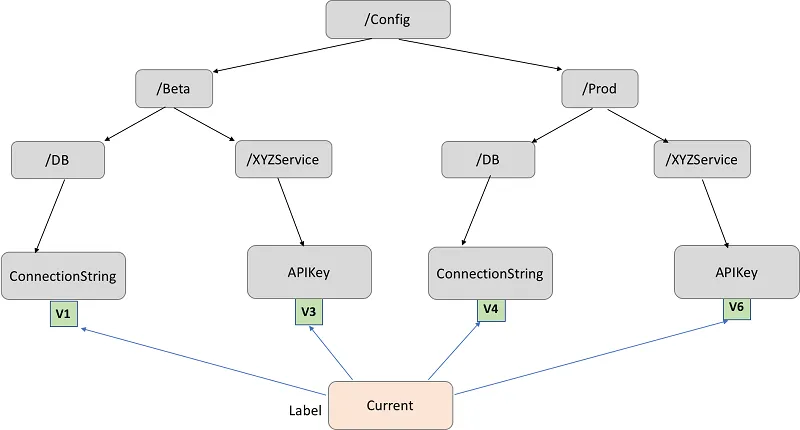
Parameter naming is easy to overlook, but it directly affects how safe your system is.
We strongly recommend hierarchical paths that encode environment and purpose:
    /prod/db/password
    /prod/api/stripe_key
    /staging/db/password
    /dev/feature_flags/new_checkout
This structure is not cosmetic. It enables:
- Environment isolation
- Least-privilege IAM policies
- Clear ownership boundaries
Without it, access control becomes vague and brittle very quickly.
Real IAM Policy Examples We Use
Parameter Store security ultimately lives in IAM. Below are patterns that have worked well for us in production.
Application Role: Read-Only Access to Its Own Parameters
Applications should read configuration, not manage it.
This keeps the blast radius small and makes intent explicit.
Human Access: Visibility Without Edit Rights
Developers often need to inspect production configuration, especially during incidents. That does not mean they should be able to change it.
This strikes a balance between transparency and safety.
CI/CD Role: Controlled Write Access
Pipelines often need to update configuration, but usually only outside production.
JWT Strategy
This keeps production changes deliberate and auditable.
At the end of the day, Parameter Store security is only as strong as your IAM discipline.
Migrating from .env Files Without Breaking Everything
The safest migrations are incremental.
Step 1: Take Inventory
List every variable in your .env files and classify them:
- Secret vs non-secret
- Environment-specific vs shared
- Still used vs legacy
This step alone often uncovers unnecessary exposure.
Step 2: Define a Clear Mapping
Create a one-to-one mapping from variables to parameter paths.

Consistency here pays dividends later.
Step 3: Upload Parameters Securely
Store each secret in Parameter Store using SecureString, scoped to the correct environment.
Do this once per environment. Treat production values as distinct assets, not copies of staging or development secrets.
At this point, secrets are centralized, encrypted, and access-controlled, but not yet used by the application.
Step 4: Read Parameters at Runtime (Not Build Time)
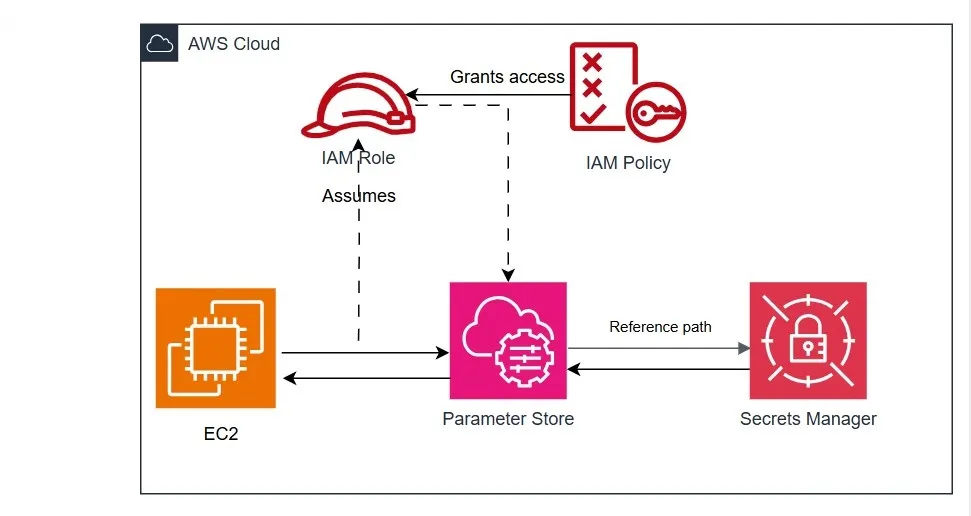
Applications should retrieve configuration when they start, not during builds or deployments.
In practice, this means:
- Fetching parameters on startup
- Caching them in memory
- Never writing them to disk or logs
This shift is critical: secrets no longer exist in build artifacts, container images, or repositories. They are only available to the running process, via IAM, for as long as the application needs them.
That distinction — runtime access instead of build-time injection — is what removes an entire class of accidental exposure.
Step 5: Remove .env Files From Production
Once verified:
-
Delete
.envfiles from servers - Remove them from CI pipelines
- Rotate credentials where appropriate
This is where the security benefits fully materialize.
Things to Keep in Mind as You Add Parameters
A few principles we have learned the hard way:
- Default to SecureString
Downgrading security is easier than retrofitting it.
- Do not treat Parameter Store as blob storage
It is for configuration, not large payloads.
- Batch reads and cache results
Especially during application startup.
- Never log parameter values
Logs are one of the most common leakage paths.
- Keep prod and non-prod strictly separate
Mixing them creates accidental exposure.
When Parameter Store Is the Right Tool (and When It Is Not)
A few principles we have learned the hard way:
- Secrets change infrequently
- IAM-based access control is sufficient
- Simplicity and predictability matter
You may want alternatives when:
- Automatic rotation is required
- Secrets are tightly coupled to managed AWS services
- You need advanced lifecycle features
In practice, many teams use Parameter Store for configuration and Secrets Manager for high-risk credentials.
Why This Improves Security in Real Terms
The biggest improvement is not encryption or IAM by themselves. It is removing ambiguity.
With Parameter Store:
- There is one place to look for configuration
- Access is explicit and reviewable
- Changes are visible and attributable
That clarity reduces mistakes, and mistakes are still the most common cause of security incidents.
Final Thoughts
Moving from .env files to AWS SSM Parameter Store is not about adopting a new tool. It is about changing how configuration is treated: from something incidental to something intentional.
You do not need to migrate everything at once. Start with one service or one sensitive secret. Once the pattern is in place, it tends to spread naturally, because it makes systems easier to reason about and safer to operate at the same time.
If you found this useful, you might also enjoy a deeper dive into IAM boundary design, or a comparison of Parameter Store and Secrets Manager in real production systems.