

Subscriptions Without the Headache: RevenueCat for React Native and React

Bisal R.

Feb 5, 2026

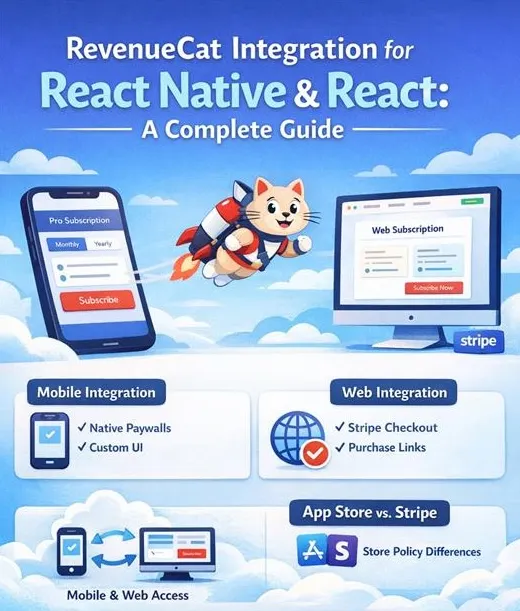
Managing subscriptions across iOS, Android, and the web quickly turns messy — different stores, different rules, different APIs. RevenueCat solves this by acting as a single source of truth for purchases and entitlements, so your app logic can stay simple and consistent everywhere.
Why RevenueCat?
At its core, RevenueCat abstracts away the hardest parts of subscription infrastructure:
- App Store and Play Store purchase handling
- Stripe-backed subscriptions for the web
- Receipt validation and renewals
- Automatic entitlement syncing across platforms
Instead of juggling store-specific logic, your app only needs to answer one question:
“Is this user premium?”
1. React Native (iOS & Android)
Requirements
Before you start, make sure you have:
- A RevenueCat account
-
The
react-native-purchasesSDK installed - Products created in both the App Store and Play Store
-
A shared
app_user_idthat matches your web app
That last point is critical — and we’ll come back to it.
Choosing Your Integration Style
RevenueCat offers two main approaches on mobile.
Option A: RevenueCat Paywalls
Best for MVPs and fast launches.
Pros
- No UI work
- Remote configuration
- Very fast to ship
Cons
- Limited customization
- Less control over branding and UX
Option B: Custom Subscription UI (Recommended for Production)
You own the UI. RevenueCat handles purchases and entitlements.
Pros
- Full control over UX and branding
- Flexible pricing screens
- Easier to evolve over time
Cons
- Slightly more implementation work
For most production apps, custom UI is the better long-term choice.
React Native Setup
Fetch Available Packages
Make a Purchase
Check Entitlements
This entitlement check is the only thing your app needs to gate features.
2. React (Web)
On the web, RevenueCat uses Stripe for payments — but RevenueCat still remains the entitlement authority, just like on mobile.
Requirements
- RevenueCat Web API key
- Stripe connected to RevenueCat
-
The same
app_user_idused on mobile
Web Integration Options
Purchase Links (Fastest)
- Hosted checkout
- Minimal setup
- Limited UI control
Custom Stripe Checkout
- Full UI control
- More development effort
RevenueCat Web Paywalls
- RevenueCat-hosted UI
- A balanced middle ground
The choice depends on how much control you need versus how quickly you want to ship.
Web SDK Setup
import { Purchases } from '@revenuecat/purchases-js';

const purchases = Purchases.configure(
  'public_web_api_key',
  user.id // SAME app_user_id as mobile
);
Fetch Customer Info
const customerInfo = await purchases.getCustomerInfo();

const isPremium =
  customerInfo.entitlements.active.premium !== undefined;
Same entitlement. Same logic. Different platform.
3. Cross-Platform Subscription Sync
This is where RevenueCat really shines.
Entitlements automatically sync when:
- A user subscribes on mobile → web unlocks
- A user subscribes on the web → mobile unlocks
No manual reconciliation. No platform-specific hacks.
The Critical Rule
app_user_id must be identical on all platforms.
If this ID changes or differs between mobile and web, entitlement syncing breaks. Use a stable identifier — never a temporary or anonymous one — for paid users.
4. Apple Policy Limitation (Important)
Apple App Store subscriptions cannot be managed on the web.
That means:
- Web UIs must be read-only for iOS subscriptions
- Users can view status, but not upgrade, downgrade, or cancel
Stripe-based subscriptions can be fully managed on the web.
RevenueCat helps enforce these rules so you stay compliant without duplicating logic or risking rejection.
Best Practices
- Use a stable, permanent app_user_id (auth ID, UUID, or database ID)
- Avoid anonymous users for paid plans
- Treat RevenueCat as the single source of truth for entitlements
- Start simple (one product, one paywall), then optimize once revenue exists
Conclusion
RevenueCat gives you something that’s surprisingly hard to build yourself: a clean, scalable subscription system that behaves the same way on mobile and web.
The real takeaway is simple:
One app_user_id. One entitlement source. Zero platform-specific complexity.
If you’re building a cross-platform product with subscriptions, RevenueCat isn’t just a convenience — it’s a solid long-term foundation.