

Google Play Console 16 KB Error: Meaning, Causes, and the Complete Fix (React Native)

Meet S.

Jan 29, 2026
)

If you’re uploading an Android App Bundle (.aab) to Google Play Console and encounter a 16 KB alignment error, don’t panic.
This is not a bug in your React Native app.
It’s a mandatory platform requirement introduced with modern Android devices, and Google Play now enforces it strictly — especially for apps targeting Android 15 (API 35) and above.
Starting with newer Android hardware, the system uses 16 KB memory pages instead of the long-standing 4 KB pages. Any app shipping native code (including React Native apps) must ensure its native libraries comply with this requirement, or the upload will be blocked.
This guide explains:
- What the 16 KB error actually means
- Why it happens (even in “working” apps)
- Which React Native and Android versions are safe
- A step-by-step, tested fix
- How to verify the issue is truly resolved
What Is the 16 KB Error?
Modern Android devices load native libraries (.so files) directly into memory using the system’s memory page size.
On newer devices, that page size is 16 KB.
If any native library inside your App Bundle is not aligned to 16 KB, Google Play Console will flag or reject the upload with errors such as:
- “Native libraries are not aligned to 16 KB”
- “Misaligned ELF files detected”
This issue almost always appears when uploading an AAB, not an APK, because App Bundles expose low-level packaging details that APKs previously hid.
Why Google Enforces 16 KB Alignment
This requirement isn’t arbitrary. Google enforces 16 KB alignment to ensure:
- Faster app startup (fewer page faults)
- Better RAM utilization
- Improved system security
- Compatibility with new Android hardware
Apps that don’t comply may still run on older devices, but they are not future-proof — and Google Play will increasingly block them.
This rule applies to all apps with native code, including:
- React Native
- Flutter
- Native Android (Kotlin/Java)
Common Causes of the 16 KB Error
The error usually occurs due to one or more of the following:
- You’re hitting real performance or scalability limits
- You need background jobs or shared state across instances
Avoid Redis When:
If your system isn’t facing these yet, Redis will likely add more complexity than value.
-
Old Android NDK (builds
.sofiles aligned to 4 KB) - Outdated React Native version
- Third-party SDKs shipping prebuilt native libraries
-
Manually added
.sofiles injniLibs/ - Legacy native library compression enabled in Gradle
Important: Even one misaligned .so file is enough for Google Play to reject the entire bundle.
Recommended Versions (Very Important)
Using modern tooling is non-negotiable. The following versions are known to work reliably with 16 KB alignment:
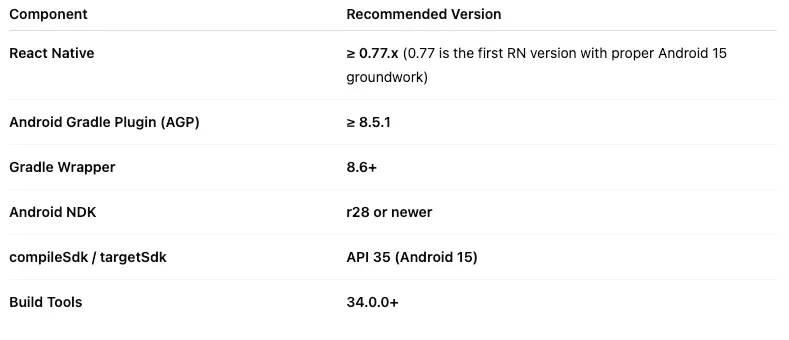
Using older versions is the #1 reason developers keep seeing this error even after “fixing” it once.
How to Fix the 16 KB Error (Step-by-Step)
Step 1: Disable Legacy Native Library Packaging (Critical)
Legacy native library compression can break alignment during packaging, even if the .so files themselves are correct.
Open android/app/build.gradle and add:
This ensures native libraries are packaged without breaking 16 KB alignment.
Step 2: Update All Native Dependencies
Any dependency that ships native code must be updated.
Common offenders include:
- Firebase SDKs
- Vision Camera
- Reanimated
- FFmpeg
- Media, camera, or DRM SDKs
Even if your app config is perfect, one outdated dependency built with an older NDK can invalidate the entire bundle.
If a dependency hasn’t released a 16 KB-compatible build yet, you may need to upgrade, replace, or temporarily remove it.
Step 3: Clean and Rebuild the App Bundle
After upgrading tooling and dependencies:
- 1. Clean the Android project
- 2. Rebuild the release App Bundle (.aab)
- 3. Do not reuse old build artifacts
This ensures all native libraries are rebuilt using the updated toolchain.
Step 4: Upload Only an .aab
Always upload a freshly generated .aab to Google Play Console.
APK uploads may still pass locally but can trigger warnings or rejections because they bypass modern packaging checks.
How to Verify the Fix
Before uploading, verify locally:
- Use Android Studio → Build → Analyze App Bundle
- Inspect the Native Libraries section
- Run on a 16 KB-page-size emulator and confirm native libs load correctly
- Ensure no warnings appear in Play Console’s pre-launch report
Verification prevents painful trial-and-error uploads.
Final Checklist Before Upload
Confirm all of the following:
- React Native 0.77 or newer
- AGP 8.5.1+
- Gradle 8.6+
- Android NDK r28+
-
compileSdkVersion/targetSdkVersion= 35 - All native dependencies updated
- Legacy native packaging disabled
-
Fresh
.aabbuilt and uploaded
If every item is checked, the error will not return.
Conclusion
The 16 KB error is not optional — it’s Android platform compliance.
Once you:
- Use modern React Native and Android tooling
- Disable legacy native library packaging
- Update all native SDKs
The issue is permanently resolved.
This change may feel disruptive, but it’s a necessary step toward faster, safer, and more future-proof Android apps.